Set how many microphones you are using, then assign the measurement location for each mic.
DSP / CHANNEL SETUP
Define what every DSP channel controls so the RTA knows exactly what you are tuning.
RTA 2.0: The complete microphone spectrum stays visible. Tuning help will target the ACTIVE channel's HPF–LPF range. Muted channels are excluded.
Start a New Tune
Tell me what controls your DSP gives you. I'll work within those limits.
NOW TUNINGNO ACTIVE CHANNELChoose an ACTIVE DSP channel on setup.
SPL--.- dB
PEAK --.- dB
MEASUREMENT MIC
MIC 1 • RIDER POSITION30" above center of seat (rider's head position)
WORKING CHANNELSelect the DSP channel you are tuning right now
No channel selected.
8-Band Parametric • Balanced
Version 2.0 Dev 26
Microphone not connected
⚠ Calibration file not loaded
MIC INPUT
NO SIGNAL
Active target ACTIVE TARGET
Signal Generator
Play test noise directly from the RTA. Start low and raise your system volume slowly.
Generator stopped
Create Curve From Song
Upload a WAV, FLAC, MP3, M4A/AAC file your browser can decode. The RTA analyzes the song itself and saves its averaged spectral balance as a purple Custom Target.
No song analyzed.
SAVED TARGET LIBRARY0 targets
No saved targets yet.
READY TO CAPTURE TARGET
DIRECT DIGITAL AUDIO • NO MICROPHONE0:00
SONG 1 • CAPTURING
EQ Assistant
When the measurement engine is locked down, this area will prioritize the most useful corrections without exceeding your selected EQ-band count.
PORT CALCULATOR
Speaker Enclosure Port Calculator
Round or slot ports • Net or gross bag airspace
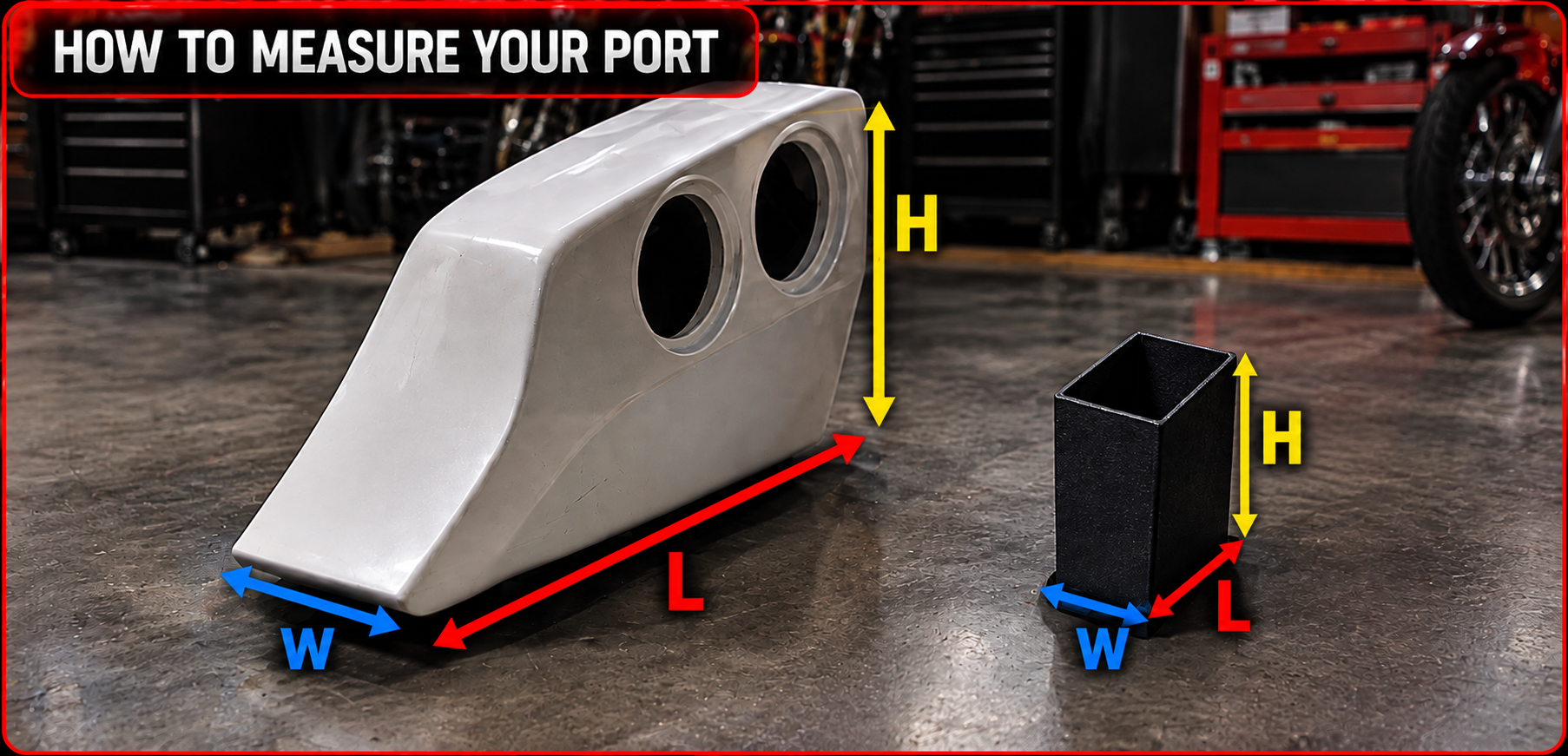
MOTORCYCLE BAG PORT REFERENCE
⚠ IMPORTANT: ALL PORT DIMENSIONS ARE INNER DIMENSIONS ONLYW × L × H are the finished clear inside measurements. Typical port walls are 4–5 mm thick, so allow for wall thickness when checking whether the finished port will physically fit inside the bag.
Enclosure
Leave at 0 to use the calculator's rough displacement estimate from woofer size and quantity. Enter the manufacturer's displacement here when known.
Woofer displacement being used--
Hz
PORT VELOCITY OPTIONAL
Enter woofer Sd and Xmax to estimate maximum port air velocity at the target frequency. Worst-case estimate assuming the woofer reaches full Xmax.
Estimated Sd each330 cm²
cm² each
mm
Port
Changes all port diameter / W / L / H dimensions. Calculations convert automatically.
Adds the material around the port to displacement. Acoustic W/L/H stay INNER dimensions.
in
Same direction as the WIDTH of the bag.
in
Same direction as the LENGTH of the bag.
in
SUGGESTED PORT
Enter airspace and target tuning. I’ll size a starting port for you.
You can still change the suggested dimensions manually before calculating.
ADVANCED SUBWOOFER SPECS OPTIONAL
Fs + Qts + Vas unlock a rough vented-box reference. Sd + Xmax calculate driver displacement capability (Vd). Missing specs never block the normal calculator.
LIVE PORT FINE TUNING
Move W, L or H and the calculated tuning updates instantly. Target Hz never changes your port dimensions.
-- Hz
Target-- Hz
Difference--
Total Port Area--
Max Velocity @ XmaxENTER Sd + Xmax
Mach--
MAX PORT VELOCITY @ XMAXNEED XMAX
0172535+ m/s
TARGET TUNING--
--TARGET--
PORT LENGTH--
Enter your enclosure and port information.
Gross Bag Airspace--
Woofer Displacement--
Port Displacement incl. Walls--
FINAL NET AIRSPACE--
Total Port Area--
Area / ft³ Net--
TARGET TUNING--
EST. ACTUAL TUNING--
Gross − Woofer(s) − Port = Final Net
TOTAL DRIVER Vd--Sd × Xmax × quantity
PORT AREA / Vd--high-output comparison aid
ADVANCED DRIVER CHECKADD Fs / Qts / VasOptional • normal calculator still works
POWER USED FOR ANALYSIS--Add amp or clamped power
NOMINAL AMP OUTPUT--Vrms / Arms from W and Ω
POWER PER BAG--System power ÷ identical bags
TOTAL SYSTEM SUBS--subs per bag × number of bags
POWER PER WOOFER--Requires woofer Pe for comparison
Port length is an acoustic starting point. Bends, flares, shared walls, stuffing, enclosure shape and the installed motorcycle environment can shift final tuning. Verify the finished enclosure with an impedance sweep or measurement when possible.
Tuning Style
This controls how aggressive the tuning recommendations will be.
SAFEMost conservative. Favors smaller EQ changes and leaves more headroom. Good when you want gentle corrections and minimum boost.
BALANCED RECOMMENDEDBest choice for most users. Makes useful corrections without getting too aggressive. This is our recommended default.
MAX CORRECTIONMore aggressive about correcting peaks and dips within the DSP limits. Best for experienced tuners who understand the effect of larger EQ changes.
★ NOT SURE? LEAVE IT ON BALANCED.
MOTORCYCLE AUDIO TUNING TIP
What Is a Good Audio-Bike Tune?
There is no single tune for every audio bike. A competition / ring bike and a rider / street bike have different jobs, so they should not be tuned with the same priorities.
🏆 COMPETITION / RING BIKE
Maximum useful output, projection and balance.
Ring bikes are where the detailed RTA work matters most. Tune individual DSP channels, front and rear stages, crossover regions and overall response. Measure where the bike will actually be judged and push the system toward its useful limits while watching distortion, clipping, speaker limits and amplifier limits.
PRIMARY GOAL: Loud, clean, balanced projection at competition listening distance.
🏍️ RIDER / STREET BIKE
Clean, reliable sound with headroom.
Rider bikes usually do not need an aggressive competition tune. Tune them lightly, keep sensible crossover protection and avoid unnecessary boost. The goal is good sound while protecting speakers and amplifiers during long periods of real-world riding.
RIDER-BIKE RULE: Clean and reliable beats squeezing out the last few dB.
🏆 COMPETITION / RING TUNING
The detailed points below are aimed primarily at competition bikes.
🔊 STRONG, CONTROLLED BASS
Sub-bass is mainly part of the stationary listening experience and what people around or behind the bike hear. Do not judge a competition sub system only from the rider's seat. Tune it for clean output and proper integration with the midbass.
🥁 MIDBASS & IMPACT
Strong midbass gives the system punch and helps bridge the subs into the mids. It needs output without becoming muddy or swallowing vocals.
🎤 NATURAL, PROJECTING MIDRANGE
Vocals and primary instruments should remain clear as listening distance increases. Output matters, but harsh, hollow or nasal mids can make a loud bike sound worse.
✨ CONTROLLED HIGHS
Tweeters and compression drivers need projection without becoming painfully bright. More top-end output is not automatically better if it destroys balance.
🎯 BALANCE AT JUDGING DISTANCE
Do not tune only while standing on top of the bike. The response needs to come together where it is actually evaluated. Peaks, missing ranges and poor stage balance can become much more obvious with distance.
↔️ FRONT & REAR STAGE
Front and rear are separate listening areas. Measure them from their intended directions instead of assuming a rider-position measurement represents the whole bike.
📏 10–12 FT FRONT / REAR CHECK
For the competition setup used here, front and rear stage checks are made roughly 10–12 ft from the bike. This helps evaluate projection and balance without standing directly on top of high-output drivers.
🔀 CROSSOVER INTEGRATION
Keep each driver working primarily where it is useful. Subs, midbass, mids and tweeters should hand off cleanly without major holes or excessive overlap.
⚡ PUSH OUTPUT INTELLIGENTLY
A ring bike may be pushed much harder than a rider bike, but useful output still ends where distortion, clipping, thermal stress or driver limits begin. Loud and damaged is not a successful tune.
📈 TARGET CURVES ARE REFERENCES
Flat, House, Audiofrog, Harman/JBL or a saved custom target gives the RTA a reference. Use the graph to expose problems, then judge the result at the intended listening position and level.
A GOOD COMPETITION TUNE: Maximum useful output with clean projection, controlled frequency balance and front/rear stages that work at the distance where the bike is actually judged.